NetSuite Saved Search Formula Examples: Checkbox Fields, Null Handling, Date Math, and Conditionals
Need help with this in your NetSuite account?
A NetSuite saved search formula field is a calculated column type that accepts Oracle SQL expressions, added in the Results tab of any saved search to produce values that do not exist as standard fields on the record. Formula fields appear alongside standard columns, support summary functions, and work the same way in grouped and ungrouped searches.
NetSuite saved searches include a formula field type that accepts Oracle SQL expressions. This lets you build calculated columns that do not exist as standard fields on the record: invoice age in days, a conditional label based on status, a formatted combination of two text fields, or a bucketed value for grouping. Formula fields appear alongside standard result columns and work in summary searches the same way standard fields do.
Most saved search users never touch formula fields because the syntax looks unfamiliar. But the functions you actually need for the most common use cases are straightforward, and the same four or five patterns cover the majority of real-world requirements.
Quick answer
Saved search formulas use Oracle SQL syntax. Field references are wrapped in curly braces: {trandate}, {entity}, {amount}. SYSDATE returns the current date. Subtracting one date from another returns the difference in days as a number. CASE WHEN...THEN...ELSE...END handles conditional logic. NVL(field, default) returns the default value when a field is null. TO_CHAR(date, 'format') converts a date to a string in the format you specify. ROUND(number, 0) rounds to the nearest integer. These functions are added in the Results tab of a saved search by clicking Add Formula and selecting the formula type that matches the return value: Formula(Text) for strings, Formula(Numeric) for numbers, Formula(Date) for dates. Getting the formula type wrong produces a blank column or an error rather than the expected output. Formula fields can also be added to the Criteria tab of a saved search, not only the Results tab, which allows filtering records by a calculated value that does not exist as a standard field on the record type.
How do you add a formula field to a saved search?
In the Results tab of a saved search, click the field selector dropdown and scroll to the Formula entries: Formula(Text), Formula(Numeric), Formula(Date), and Formula(Checkbox). Select the type that matches what your formula returns.
After selecting the formula type, an input field appears where you enter the expression. The formula references record fields using curly braces around the field's internal ID: {trandate} for the transaction date, {entity} for the customer, {amount} for the total.
The formula type must match the return type of the expression. If your CASE WHEN formula returns a text string, use Formula(Text). If it returns a number, use Formula(Numeric). Using the wrong type produces a blank column rather than an error message, which makes the mismatch hard to diagnose.
| Formula type | Returns | Use case | Common functions |
|---|---|---|---|
| Formula(Text) | String | Labels, categories, formatted dates, concatenated fields | CASE WHEN, TO_CHAR, NVL, || |
| Formula(Numeric) | Number | Days-old calculations, ratios, arithmetic | SYSDATE - {date}, ROUND, NVL |
| Formula(Date) | Date | Computed dates, date offsets | ADD_MONTHS, NVL |
| Formula(Checkbox) | T / F | Boolean filter flags, yes/no conditions | CASE WHEN ... 'T' ELSE 'F' |
| Formula(Percent) | Percentage | Margin rates, completion percentages | Division on numeric fields |
| Formula(Currency) | Currency | Calculated amounts, multi-field totals | Arithmetic on currency fields |
What is the formula for calculating invoice age in days?
ROUND(SYSDATE - {trandate})SYSDATE is Oracle's built-in current date/time. Subtracting a date field from SYSDATE returns the number of days as a decimal. ROUND converts it to a whole number. Use Formula(Numeric) for this expression.
For invoices specifically, you more often want days past due rather than days from transaction date:
ROUND(SYSDATE - {duedate})This returns a negative number for invoices that are not yet due, and a positive number for overdue invoices. A zero-filter on this column (greater than 0) gives you all overdue invoices.
For an aging bucket display (0-30, 31-60, 61-90, 91+), combine with CASE WHEN:
CASE
  WHEN ROUND(SYSDATE - {duedate}) <= 0 THEN 'Current'
  WHEN ROUND(SYSDATE - {duedate}) <= 30 THEN '1-30 days'
  WHEN ROUND(SYSDATE - {duedate}) <= 60 THEN '31-60 days'
  WHEN ROUND(SYSDATE - {duedate}) <= 90 THEN '61-90 days'
  ELSE '90+ days'
END
Use Formula(Text) for the bucketed version. This column is also useful as a group-by field in a summary search to aggregate amounts by aging bucket.
How do you use CASE WHEN for conditional output?
CASE WHEN is the primary tool for conditional logic in formula fields. The syntax:
CASE WHEN {condition} THEN {result} ELSE {default} ENDA practical example: flag transactions that exceed a threshold.
CASE WHEN {amount} >= 10000 THEN 'Large' WHEN {amount} >= 1000 THEN 'Medium' ELSE 'Small' ENDYou can chain as many WHEN clauses as needed. NetSuite evaluates them in order and returns the first match. Use Formula(Text) when the output values are strings.
For a boolean output that works as a filter:
CASE WHEN {status} = 'A' AND {amount} > 0 THEN 'T' ELSE 'F' ENDUse Formula(Checkbox) for true/false outputs. The checkbox result can then be used as a filter criterion in the Criteria tab of another saved search.
How do you handle null values in formula fields?
Fields that are optional in NetSuite return null when they have no value. A formula that references a null field without handling it will return null for the entire expression, producing a blank result.
NVL (Null Value) replaces null with a default:
NVL({custbody_approver}, 'No Approver Set')For numeric fields, this prevents null from propagating through arithmetic:
ROUND(SYSDATE - NVL({duedate}, SYSDATE))Using NVL({duedate}, SYSDATE) means records with no due date return 0 (not yet overdue) rather than null for the age calculation.
You can also use NVL in CASE WHEN to distinguish between null and a specific value:
CASE WHEN {custbody_region} IS NULL THEN 'Unassigned' ELSE {custbody_region} ENDIS NULL is more explicit than NVL when the goal is to specifically test for the absence of a value rather than to substitute a default.
How do you format dates as text?
Subtracting dates returns a number. Displaying a date in a specific format requires TO_CHAR:
TO_CHAR({trandate}, 'MM/DD/YYYY')Common format strings:
'MM/DD/YYYY'produces 08/07/2026'Mon DD, YYYY'produces Aug 07, 2026'YYYY-MM-DD'produces 2026-08-07 (ISO format, useful for sorting)'MM/YYYY'produces 08/2026 (for month-level grouping)
Use Formula(Text) for TO_CHAR expressions. The output is a string, not a date, so it cannot be filtered with date range operators. If you need both a formatted display and a filterable date, add two columns: one standard date column for filtering and one Formula(Text) for display.
For a month-year grouping in a summary search, the 'MM/YYYY' format lets you group transactions by month without losing the year context:
TO_CHAR({trandate}, 'MM/YYYY')How do you concatenate fields in a formula?
The || operator concatenates strings in Oracle SQL:
{entity.entityid} || ' - ' || {tranid}This produces an output like CUST-1042 - INV-8931, combining the customer entity ID and the transaction number. Use Formula(Text).
For a vendor name plus address line for a printed report:
{entity.entityid} || ' (' || NVL({billingaddress.addr1}, 'No address') || ')'Note that multi-level field references (entity.entityid, billingaddress.addr1) are available in formula fields the same way they are in standard column expressions. The field ID uses dot notation to traverse the relationship.
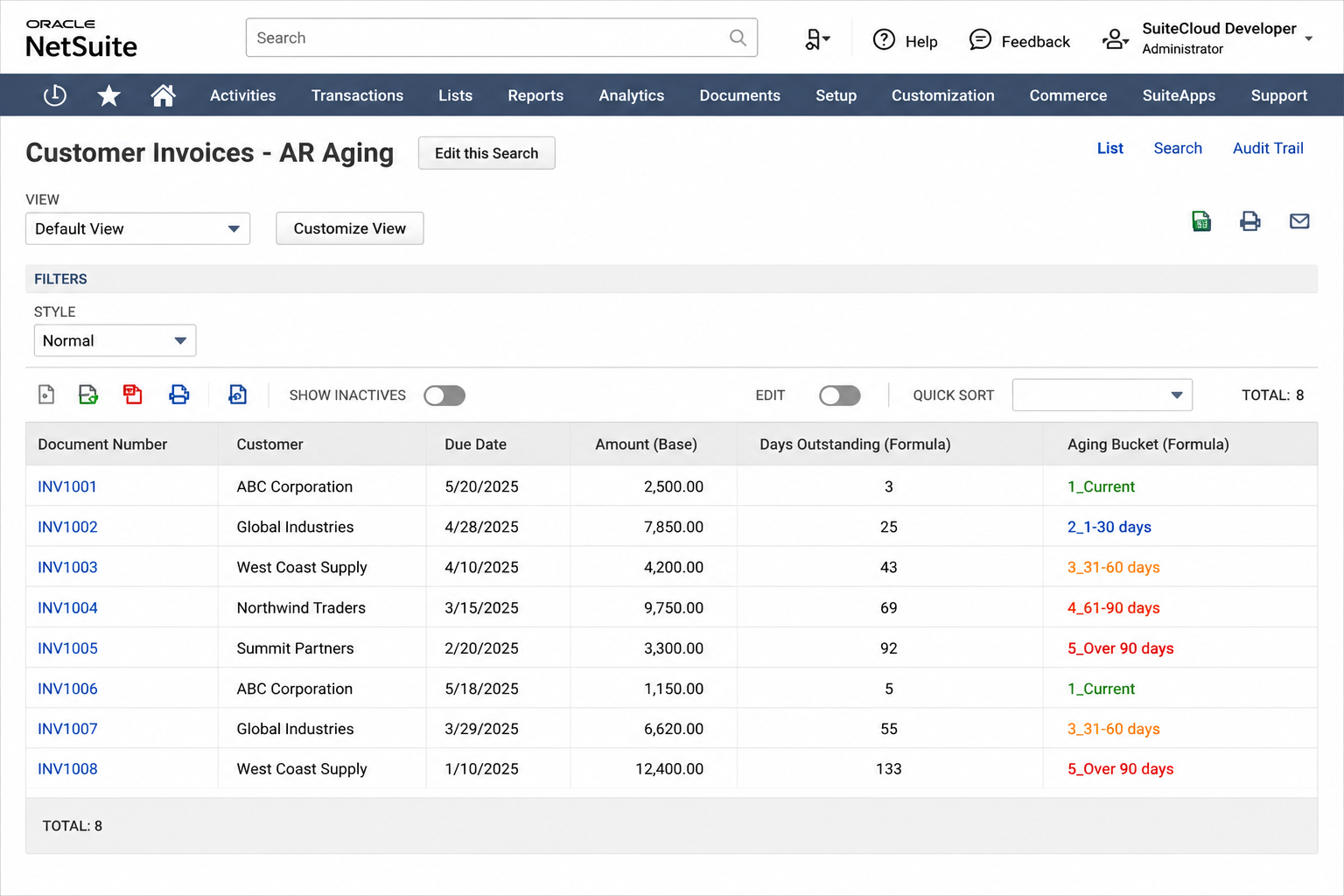
CASE WHEN examples for finance and operations teams
The following formulas cover the most common conditional logic requirements on finance and operations saved searches. Each can be added as a Formula(Text) or Formula(Numeric) column in the Results tab.
AR aging bucket label (used as a group-by column in summary searches):
CASE
  WHEN ROUND(SYSDATE - {duedate}) <= 0 THEN '1_Current'
  WHEN ROUND(SYSDATE - {duedate}) <= 30 THEN '2_1-30 days'
  WHEN ROUND(SYSDATE - {duedate}) <= 60 THEN '3_31-60 days'
  WHEN ROUND(SYSDATE - {duedate}) <= 90 THEN '4_61-90 days'
  ELSE '5_Over 90 days'
END
Prefixing each label with a number forces the correct sort order when the column is used as a group-by field. Use Formula(Text).
Approval status flag for exception searches:
CASE
  WHEN {approvalstatus} = 'Approved' AND {amount} > 50000 THEN 'Large - Approved'
  WHEN {approvalstatus} = 'Approved' THEN 'Approved'
  WHEN {approvalstatus} = 'Pending Approval' AND ROUND(SYSDATE - {trandate}) > 3 THEN 'Overdue - Pending'
  WHEN {approvalstatus} = 'Pending Approval' THEN 'Pending'
  ELSE 'Rejected / Draft'
END
This surfaces overdue pending approvals as their own category in a single column. Useful for an AP exceptions dashboard. Use Formula(Text).
Revenue recognition period flag:
CASE
  WHEN TO_CHAR({startdate}, 'MM/YYYY') = TO_CHAR(SYSDATE, 'MM/YYYY') THEN 'Recognizing This Month'
  WHEN {startdate} > SYSDATE THEN 'Future'
  WHEN {enddate} < SYSDATE THEN 'Fully Recognized'
  ELSE 'Active'
END
Useful for SuiteBilling or ARM searches to quickly classify arrangements by their current recognition state. Use Formula(Text).
Margin tier (calculated from amount and cost fields):
CASE
  WHEN {amount} = 0 THEN 'No Revenue'
  WHEN ({amount} - NVL({estgrossprofit}, 0)) / {amount} < 0.1 THEN 'Low Margin (<10%)'
  WHEN ({amount} - NVL({estgrossprofit}, 0)) / {amount} < 0.25 THEN 'Mid Margin (10-25%)'
  ELSE 'High Margin (>25%)'
END
Use Formula(Text). Note that {estgrossprofit} field availability varies by transaction type and account configuration; confirm the internal field ID for your account in the field selector.
Days since last customer activity (for customer aging in CRM workflows):
ROUND(SYSDATE - NVL({lastmodifieddate}, {datecreated}))Returns number of days since the customer record was last modified, falling back to the creation date if no modification has occurred. Use Formula(Numeric). Add a CASE WHEN wrapper to convert to a category label if needed for grouping.
Multi-subsidiary allocation label:
CASE
  WHEN {subsidiary} = 'Parent Company : US Operations' THEN 'US'
  WHEN {subsidiary} = 'Parent Company : UK Operations' THEN 'UK'
  WHEN {subsidiary} = 'Parent Company : Canada' THEN 'CA'
  ELSE 'Other'
END
Useful for consolidating subsidiary names into shorter labels for reporting. Replace the subsidiary display names with the actual values from your account. Use Formula(Text).
The pattern across all of these is the same: evaluate a condition or set of conditions, return a label or value based on the first matching condition, and close with END. Chaining multiple WHEN clauses handles ranges; combining field comparisons with AND and OR inside a single WHEN handles compound conditions.
What formula shows transactions created this month?
CASE WHEN TO_CHAR({trandate}, 'MM/YYYY') = TO_CHAR(SYSDATE, 'MM/YYYY') THEN 'T' ELSE 'F' ENDUse Formula(Checkbox) and filter for checked (T) to see only transactions from the current month. This approach works without needing to update date range filter values manually when the month rolls over.
For the previous month:
CASE WHEN TO_CHAR({trandate}, 'MM/YYYY') = TO_CHAR(ADD_MONTHS(SYSDATE, -1), 'MM/YYYY') THEN 'T' ELSE 'F' ENDADD_MONTHS(date, n) adds or subtracts months from a date. Negative values go backwards. This is more reliable than subtracting 30 days, since month lengths vary.
Saved search formulas are one of the higher-leverage tools in NetSuite because they let you build logic once and reuse it across dashboards, scheduled reports, and workflow criteria. Our saved searches and dashboards service includes building formula-based searches for finance teams, operations, and management reporting. For related reading, see NetSuite Saved Search Examples for Finance and Operations Teams and NetSuite Saved Search Tips.
Frequently asked questions
Q: Why is my Formula(Numeric) column showing blank instead of a number? A: The most common causes are a type mismatch (the formula returns text but the column type is Numeric), a null field propagating through the expression (wrap with NVL), or a syntax error in the formula. NetSuite does not always show a clear error for formula mistakes; a blank column usually means one of these three issues.
Q: Can formula fields be used in saved search criteria, not just results?
A: Yes. In the Criteria tab, select Formula(Text), Formula(Numeric), or the relevant type and enter the same expression syntax. This lets you filter records based on a calculated value, such as showing only invoices more than 60 days old using ROUND(SYSDATE - {duedate}) > 60 as a Formula(Numeric) criteria.
Q: Are there performance considerations for formula fields in large result sets? A: Formula fields are evaluated for each row in the result set. Simple arithmetic and CASE WHEN expressions have minimal impact. Complex expressions with multiple nested NVL calls or string concatenation across many rows can slow the search. If a saved search with formula fields is timing out, simplify the formula or add criteria to reduce the number of rows being evaluated.
Q: Can I reference one formula column result in another formula column? A: Not directly by name. However, you can repeat the expression in a second formula rather than referencing it by an alias. If the repeated expression is complex, consider using a CASE WHEN in the second formula that re-evaluates the same logic rather than trying to cross-reference formula column results.
Q: What is the difference between DECODE and CASE WHEN?
A: Both handle conditional logic. DECODE is an Oracle-specific function: DECODE(field, value1, result1, value2, result2, default). CASE WHEN is standard SQL and more readable for complex conditions. Either works in NetSuite formula fields. For new formulas, CASE WHEN is generally preferred because it is easier to read and supports range comparisons (WHEN amount > 1000) that DECODE cannot express cleanly.
Related reading
- NetSuite saved searches and dashboards: custom saved searches, KPI reporting, and dashboard builds for live accounts.
- NetSuite saved search examples: practical search configurations for common operational and financial reporting needs.
- NetSuite saved search examples: practical search configurations for common operational and financial reporting needs.
More From the Blog
NetSuite CAM Reconciliation for Commercial Real Estate
NetSuite CAM reconciliation requires custom records and scripts to allocate operating expenses to tenants by area and generate annual true-up invoices.
NetSuite Lot Tracking with Expiry for Medical Devices
NetSuite lot tracking with expiration dates for medical devices requires FEFO picking logic and automated expiry alerts to meet FDA traceability needs.
Have a NetSuite challenge like this?
We work with post-go-live NetSuite accounts every day. Tell us what you're working on.
Tell us what your account needs.