Why Your NetSuite Account Feels Slow (and What Actually Fixes It)
Need help with this in your NetSuite account?
NetSuite account performance is the measure of how quickly the platform responds across all user-facing actions: record loads, saved search execution, script processing, and scheduled job completion times. Degradation is almost always caused by configuration decisions and data volume, not by infrastructure limitations.
When a client tells us their account "got slow," it's almost never one cause. Usually two or three smaller things have been quietly adding up for a year or more, and none of them need an infrastructure upgrade to fix. Here's the order we check them in.
Why is NetSuite so slow?
NetSuite accounts slow down for one of a small number of reasons, and almost none of them are server-side problems you need Oracle to resolve. The most common causes, ranked by how often we find them on client accounts:
Dashboard portlet searches with complex joins. Every dashboard portlet that shows a saved search runs that search live on page load, for every user who opens their home page. A saved search that takes four seconds to return results produces a four-second page load delay, and runs dozens or hundreds of times per day across the account. This is the single most common cause of a NetSuite account that feels slow for everyone simultaneously.
Scripts queuing behind a failed scheduled job. Scheduled scripts and Map/Reduce scripts share a processing queue. When a script fails mid-execution without properly yielding its governance, it can hold a queue position and delay every other script scheduled around it. If the account feels sluggish at the same time every day (7 AM, midnight, end of business), a scheduled script problem is the most likely explanation.
User Event scripts and workflows without entry conditions. Every active User Event script and workflow with no entry condition fires on every save of its target record type, regardless of what changed. An account with twelve such customizations on Sales Order incurs the overhead of twelve script executions and twelve workflow evaluations every time any sales order is saved, even for edits that have nothing to do with what the customizations are checking.
Metadata accumulation over time. Every custom field loads with its record type, even fields that are not on any active form and have not been used since the consultant who created them left the project. Accounts more than two years old commonly have hundreds of these. The load is small per field but adds up.
Searches that filter too late. A saved search with minimal criteria that loads thousands of rows and then applies filtering in a formula column or via the available-filter UI is doing far more work than a search with the same filters in the criteria tab. The difference is where the filtering happens: criteria run at the database level before any rows are returned to the user; formula filters run after.
The key question for each of these: when did the slowness start? Sudden slowdowns usually trace to a specific change (a newly deployed script, a newly added portlet, a release that changed a behavior). Gradual slowdowns over months usually trace to accumulation (more customizations, more data volume, more searches added to dashboards).
NetSuite performance diagnostic checklist
Before escalating a performance issue to Oracle Support, work through this checklist. These are the checks that consistently surface the root cause in the shortest time.
| Check | Where to look in NetSuite | What to look for |
|---|---|---|
| Dashboard portlet search count | Home page, customize dashboard | More than 3-4 portlets showing saved search results |
| Portlet search complexity | Reports > Saved Searches, open each portlet search | Searches with 3+ joined record types or 4+ formula columns |
| Scheduled script timing | Customization > Scripting > Scheduled Scripts > Deployment | Scripts scheduled at the same time as the slowdown |
| Script execution errors | Customization > Scripting > Script Execution Log | Failed or errored executions in the relevant time window |
| Workflows without conditions | Customization > Workflow > Workflows | Workflows set to trigger "On Any Event" with no entry criteria |
| User Event scripts without conditions | Customization > Scripting > Script Deployments | Deployments with no Condition field set, high execute count |
| Unused custom fields | Customization > Lists, Records and Fields | Fields not assigned to any active transaction form |
| Unused saved searches | Reports > Saved Searches > All Saved Searches | Searches not accessed in 90+ days, still scheduled to run |
| Concurrent user session count | Your Oracle account manager or NS Help Center | Unusually high concurrent sessions during slow periods |
| Recent customization changes | Customization > SuiteCloud > SuiteScript > Script Deployments | Newly deployed scripts in the window before slowdown began |
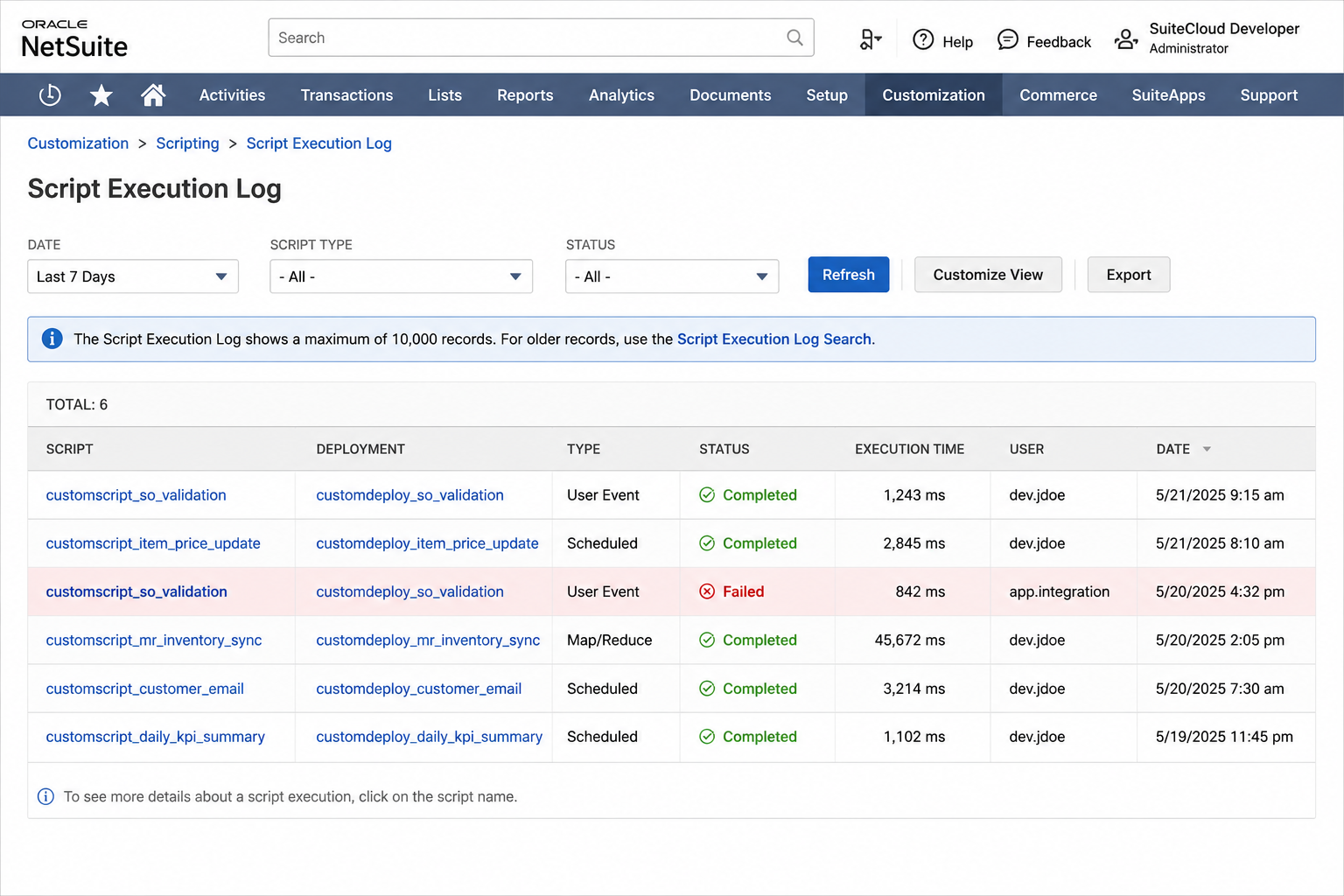
The Script Execution Log is the single most useful diagnostic tool. Navigate to Customization > Scripting > Script Execution Log in your NetSuite account. Filter by Status = "Failed" or "System Error" and set the date range to the window when the slowness started. Any scripts appearing with high frequency in an error state during that window are candidates for the root cause.
Quick answer
A slow NetSuite account is almost always caused by fixable configuration issues, not infrastructure limits. Check in this order: dashboard portlet searches with complex joins and formula columns, which run on every page load for every user on a role; Scheduled or Map/Reduce scripts that do not yield governance properly before hitting limits, which back up the entire script queue; workflows and User Event scripts with no entry conditions, firing on every record save including irrelevant ones; years of unused custom fields, forms, and saved searches that add metadata overhead on every load; and saved searches that apply formula filters after loading too many rows, rather than filtering at the criteria level. None of these require an infrastructure upgrade. All are configuration issues. Start with dashboard portlet searches because they execute more frequently than any other search in the account.
1. Dashboards loading saved searches with too many joined fields
A saved search with several formula columns and joins two or three tables deep is fine running once. Put it on a dashboard that five people load every morning, and that same search runs repeatedly against live data, every time. Start by auditing whatever saved searches are pinned to dashboards and home pages, since those run far more often than anyone realizes, and trim or rebuild the heaviest ones first.
The audit is straightforward: open the home page in edit mode, note which portlets are saved search results, then open each of those searches and look at the columns. Any search with joins to more than two levels of related records (Transaction to Item to Vendor, for example) and several formula columns is a candidate for optimization. Either simplify the join structure or remove the portlet from the default home page and replace it with a link to run the search manually.
2. Scripts that don't yield governance properly
Scheduled and Map/Reduce scripts that don't check remaining governance units and yield (or re-queue) before hitting the limit fail in a way that backs up the entire script queue behind them. Other scripts scheduled around the same time get delayed too, since they're waiting on shared infrastructure, not just the one that errored. If the whole account feels sluggish at the same time every day, check what's scheduled to run then first.
In the Script Execution Log (Customization > Scripting > Script Execution Log), filter by the time window when the slowness occurs and look for scripts with Status = "Error" or that show unusually long execution times. A Map/Reduce script that should process a nightly batch in two minutes and instead takes forty-five is a sign it is iterating inefficiently or hitting governance limits mid-run.
The fix depends on the script type. For Scheduled scripts, add a governance check (runtime.getCurrentScript().getRemainingUsage()) before each batch loop and re-queue if remaining usage drops below a safe threshold. For Map/Reduce scripts, ensure the reduce stage is not doing unbounded processing on large input sets without yielding.
3. Workflows and User Event scripts firing on every save, not just relevant changes
The same issue that causes workflows to misfire (covered in 5 Common NetSuite Workflow Automation Mistakes) also causes them to run constantly in the background, on every save, for fields nobody cares about changing. Each one is a small cost. A dozen of them running on every transaction across the account adds up to a real, measurable drag.
To find workflows without entry conditions, go to Customization > Workflow > Workflows. Open each workflow and check the Initiation tab. Workflows set to "On Any Event" with no Initiation Condition evaluate every save for the target record type. Most workflows need to run only when a specific field changes or a specific status is reached. Adding an initiation condition that checks a relevant field value removes the evaluation overhead on every irrelevant save.
For User Event scripts, check Customization > Scripting > Script Deployments. Any deployment with no Condition field set runs on every save of the target record type. Scripts built to fire only when specific fields change can use the context.type check in the script itself, but a deployment-level condition removes the script from the execution queue entirely for irrelevant saves.
4. Years of unused custom fields, forms, and saved searches
Every custom field, custom form, and saved search adds to the metadata NetSuite has to load and evaluate, even the ones nobody has opened in two years. Accounts that have been live for a while accumulate this kind of debris constantly: fields from a process that changed, forms from a project that ended, searches built for a one-time report. A periodic cleanup pass, removing or deactivating what's genuinely unused, is one of the simplest, lowest-risk ways to lighten the account.
Deactivate rather than delete when in doubt. Deactivating a custom field removes it from record load overhead while preserving any historical data stored in it. If it turns out the field was used for something you forgot about, reactivation is immediate. Deletion is permanent. The exception is truly orphaned fields with no data and no history, which can be safely deleted.
For saved searches, sort the All Saved Searches list by Last Modified and look for searches that have not been updated in over a year and have no scheduled email. These are candidates for deletion or archiving. If the search has a scheduled email active, check who is receiving it before disabling.
5. Saved searches filtering after loading instead of before
A search that loads a broad set of records and then filters with a formula or summary calculation is doing far more work than one that filters with indexed criteria fields first. Moving date ranges, statuses, and other simple conditions into the actual search criteria, instead of relying on formula filters or filtering visually after the fact, is usually a quick fix with a real, noticeable difference in load time.
The common pattern that causes this: a search built with no date criteria that returns all transactions of a type, then uses an available filter to let users pick a date range at run time. The search loads every transaction first, then filters. The fix is to set a default date range in the Criteria tab (This Fiscal Year, or a Relative Date value) so the database query is bounded before any rows are returned. Users can still override the filter if they need a different range.
What does normal NetSuite performance look like?
Having a rough benchmark for expected load times helps distinguish between a real performance issue and an expectation mismatch. These are the load times we use as a reference for a healthy account on a standard connection:
- Simple record load (Customer, Vendor, Item with minimal custom fields): under 2 seconds
- Transaction record load (Sales Order, Invoice with standard line items): 2-4 seconds
- Saved search returning 100-500 rows with 8-10 columns and no formulas: 2-5 seconds
- Saved search with formula columns and joined records, 500+ rows: 5-15 seconds (acceptable for an on-demand run, not for a dashboard portlet)
- Dashboard home page load: under 5 seconds (faster if portlets are limited)
- Scheduled script processing a nightly batch of 1,000 records: 3-8 minutes depending on operations per record
If your account consistently exceeds these ranges for simple operations, the diagnostic checklist above is the starting point. If it exceeds them only during peak hours (8-10 AM in the account's primary time zone), shared infrastructure load is a contributing factor, but reducing the complexity of whatever runs at peak hours still helps.
Frequently asked questions
Q: How do I find which scripts are causing performance issues? A: Check the Script Execution Log in NetSuite, available under Customization > Scripting > Script Execution Log. Filter by date, script type, and execution status to identify scripts that are failing, timing out, or running more frequently than expected.
Q: How do I identify which dashboard portlet searches are the slowest? A: Run the search in isolation using the saved search editor and note the time to return results. Portlet searches with joins to multiple related record types and several formula columns are the most likely candidates. Compare the load time with and without the portlet assigned to the dashboard.
Q: How do I find unused custom fields in a NetSuite account? A: Go to Customization > Lists, Records, and Fields and review each field type. Fields that do not appear on any active transaction form and have not been updated recently are candidates for deactivation rather than deletion. Deactivating preserves the data while removing the load overhead.
Q: Will removing unused workflows break anything? A: Deactivate workflows rather than delete them initially. An inactive workflow does not run but can be reactivated if needed. Before deactivating, confirm the workflow has not been used recently by checking its execution history.
Account performance issues are almost always fixable without an upgrade or a re-implementation, just a focused look at what's actually running and how often. This kind of cleanup is part of our account optimization service. If your account has gotten noticeably slower over time, book a free consultation and we'll help you find out why. For related reading, see 10 NetSuite Saved Search Tips Every Finance Team Should Know and NetSuite Account Optimization: What to Audit and Fix on a Live Account.
Related reading
- NetSuite health check: a structured review that surfaces performance bottlenecks, unused customizations, and configuration debt.
- NetSuite account optimization: what optimization covers: performance, saved searches, workflows, and reporting improvements.
- NetSuite technical debt: what technical debt looks like in a live NetSuite account and how to address it.
More From the Blog
NetSuite CAM Reconciliation for Commercial Real Estate
NetSuite CAM reconciliation requires custom records and scripts to allocate operating expenses to tenants by area and generate annual true-up invoices.
NetSuite Lot Tracking with Expiry for Medical Devices
NetSuite lot tracking with expiration dates for medical devices requires FEFO picking logic and automated expiry alerts to meet FDA traceability needs.
Have a NetSuite challenge like this?
We work with post-go-live NetSuite accounts every day. Tell us what you're working on.
Tell us what your account needs.