NetSuite RESTlet vs REST Web Services: Which Integration Approach to Use
Need help with this in your NetSuite account?
A RESTlet is a custom SuiteScript-based REST endpoint that you write, deploy, and maintain inside NetSuite. REST Web Services is NetSuite's built-in REST API that provides standard CRUD operations and SuiteQL access for all major record types without requiring any custom code.
The two main ways to build REST-based integrations with NetSuite are RESTlets and REST Web Services. Both accept HTTP requests and return JSON. Both support Token-Based Authentication. But they work differently and are built for different problems. RESTlets are custom SuiteScript endpoints you write and maintain. REST Web Services is NetSuite's built-in REST API that requires no custom code.
Choosing between them comes down to what the integration needs to do. Standard record operations (create, read, update, delete, query) belong in REST Web Services. Custom business logic, cross-record lookups, and integrations that need a non-standard response structure belong in RESTlets. In many accounts, both coexist: REST Web Services handles straightforward data exchange and a RESTlet exposes a custom endpoint for something the built-in API cannot do.
Quick answer
RESTlets are SuiteScript-based custom REST endpoints you build and deploy in NetSuite. They run on NetSuite's servers with full access to the SuiteScript 2.x module library, so they can load records, run searches, call external APIs, and apply complex business logic in a single request. REST Web Services is NetSuite's built-in REST API that provides standard CRUD operations for all major record types and SuiteQL query access, with no custom code required. REST Web Services supports OAuth 2.0 in addition to Token-Based Authentication, making it the preferred choice for integrations managed by third parties. RESTlets support TBA only. Use RESTlets when you need custom logic at the integration layer, a combined response from multiple record types, or a non-standard response format. Use REST Web Services for standard record operations, SuiteQL queries, batch processing, and OAuth 2.0 authentication.
What is a NetSuite RESTlet and how does it work?
A RESTlet is a SuiteScript 2.x script with the script type @NScriptType RESTlet. You write up to four entry point functions that correspond to HTTP methods: get, post, put, and delete. When an external system sends an HTTP request to the RESTlet's URL, NetSuite routes it to the appropriate function based on the method used.
RESTlets are deployed at Customization > Scripting > Scripts > New, selecting RESTlet as the script type. Once deployed, the URL follows this pattern:
https://[accountID].restlets.api.netsuite.com/app/site/hosting/restlet.nl?script=[scriptID]&deploy=[deployID]Inside a RESTlet, you have full access to the SuiteScript 2.x module library. A get handler can load a record, query a saved search, call an external API, and combine results from multiple sources before returning a single JSON response. This is the primary advantage over REST Web Services: the logic lives at the endpoint layer, not in the calling system.
/**
 * @NApiVersion 2.1
 * @NScriptType RESTlet
 */
define(['N/search', 'N/error'], (search, error) => {

    function get(params) {
        if (!params.customerId) {
            throw error.create({
                name: 'MISSING_PARAMETER',
                message: 'customerId is required',
            });
        }

        const results = [];
        search.create({
            type: search.Type.TRANSACTION,
            filters: [
                ['entity', 'is', params.customerId],
                'AND',
                ['mainline', 'is', true],
                'AND',
                ['status', 'is', 'SalesOrd:B'],
            ],
            columns: ['tranid', 'trandate', 'amount', 'status'],
        }).run().each((result) => {
            results.push({
                id: result.id,
                number: result.getValue('tranid'),
                date: result.getValue('trandate'),
                amount: result.getValue('amount'),
                status: result.getText('status'),
            });
            return true;
        });

        return { customerId: params.customerId, orders: results };
    }

    return { get };
});
This RESTlet accepts a customerId query parameter, runs a search across transaction records, and returns a combined result in one HTTP call. The equivalent in REST Web Services would require a SuiteQL query and then separate record reads, or a more complex SuiteQL that joins across record types.
What is NetSuite REST Web Services and when should you use it?
REST Web Services is NetSuite's built-in REST API. No SuiteScript required. It is enabled at Setup > Company > Enable Features under the SuiteCloud tab. Once enabled, every standard NetSuite record type is accessible at a consistent endpoint:
https://[accountID].suitetalk.api.netsuite.com/services/rest/record/v1/[recordtype]/[id]Standard operations:
GET /[recordtype]/[id]retrieves a recordPOST /[recordtype]creates a recordPATCH /[recordtype]/[id]updates an existing recordDELETE /[recordtype]/[id]deletes a recordPUT /[recordtype]/[id]creates or updates (upsert)
SuiteQL queries run at a separate endpoint:
https://[accountID].suitetalk.api.netsuite.com/services/rest/query/v1/suiteqlBatch operations, including the sequential processing added in 2026.2, are available at the batch endpoint. Sequential batch is the correct approach when one operation in a batch depends on the result of a previous one. See NetSuite REST Web Services sequential batch processing for details.
REST Web Services records every operation against the standard NetSuite audit trail. User Event scripts still fire on records created or updated through the REST API. If your account has a beforeSubmit validation that rejects certain field values, that rejection will be returned as an HTTP error response.
How does authentication differ between the two?
Both RESTlets and REST Web Services support Token-Based Authentication (TBA). The key difference is OAuth 2.0.
REST Web Services supports OAuth 2.0 Machine-to-Machine (Client Credentials grant) in addition to TBA. OAuth 2.0 is simpler for most third-party tools and iPaaS platforms to implement because it does not require computing HMAC-SHA256 signatures per request. Most modern integration platforms handle OAuth 2.0 client credentials flows natively.
RESTlets support TBA and NLAuth. NLAuth is being retired: integrations using it need to migrate to TBA before 2027.1. See NLAuth and TBA migration timeline for the deadline details. RESTlets do not support OAuth 2.0.
For a new integration where the calling system supports OAuth 2.0, REST Web Services reduces the authentication complexity for whoever builds and maintains the external side of the connection.
When should you use a RESTlet?
Use a RESTlet when the integration needs to:
- Execute business logic at the endpoint layer, not just pass data through
- Retrieve data from multiple record types and combine it into one response
- Apply transformations or validations before writing to NetSuite
- Return a custom JSON structure that does not match NetSuite's standard record format
- Support a calling system that cannot implement OAuth 2.0 or requires TBA specifically
- Call an external API as part of handling the incoming request
RESTlets are also appropriate when migrating an existing NLAuth-authenticated RESTlet to TBA is simpler than rewriting the integration around REST Web Services.
When should you use REST Web Services?
Use REST Web Services when the integration needs to:
- Perform standard CRUD operations on NetSuite records
- Run SuiteQL queries for reporting or data extraction
- Process batch operations with controlled ordering
- Integrate with third-party tools or iPaaS platforms using OAuth 2.0
- Avoid maintaining custom SuiteScript code on the NetSuite side
- Follow standard REST conventions that the wider development team already understands
REST Web Services is maintained by Oracle and updated with each NetSuite release. Standard record types gain new fields and capabilities without requiring changes to the integration code. For net-new integrations that do not require custom logic at the endpoint layer, REST Web Services is the default choice.
Decision framework: RESTlet or REST Web Services?
If the integration requirement fits one of these patterns, the choice is straightforward:
| Scenario | Use |
|---|---|
| Create, read, update, or delete a standard NetSuite record | REST Web Services |
| Query NetSuite data using SQL syntax | REST Web Services (SuiteQL endpoint) |
| Return data from multiple record types in one HTTP call | RESTlet |
| Apply business logic or validation before writing to NetSuite | RESTlet |
| Third-party iPaaS tool (Celigo, Boomi, Workato) managing the connection | REST Web Services (OAuth 2.0 support) |
| Internal tool or service managing TBA credentials directly | Either (TBA supported by both) |
| Migrate from an NLAuth-authenticated endpoint | RESTlet (same architecture, credential swap only) |
| Net-new integration, no custom logic required | REST Web Services |
| Real-time combined lookup from multiple record types | RESTlet |
| Batch data extraction for reporting or data warehouse | REST Web Services (SuiteQL + pagination) |
The most common case where teams choose RESTlet over REST Web Services is the combined lookup: an external system needs customer data plus open orders plus recent payments in a single API call. REST Web Services requires three separate requests and client-side assembly. A RESTlet handles the joins in SuiteScript and returns a single shaped response.
How to migrate a RESTlet from NLAuth to TBA
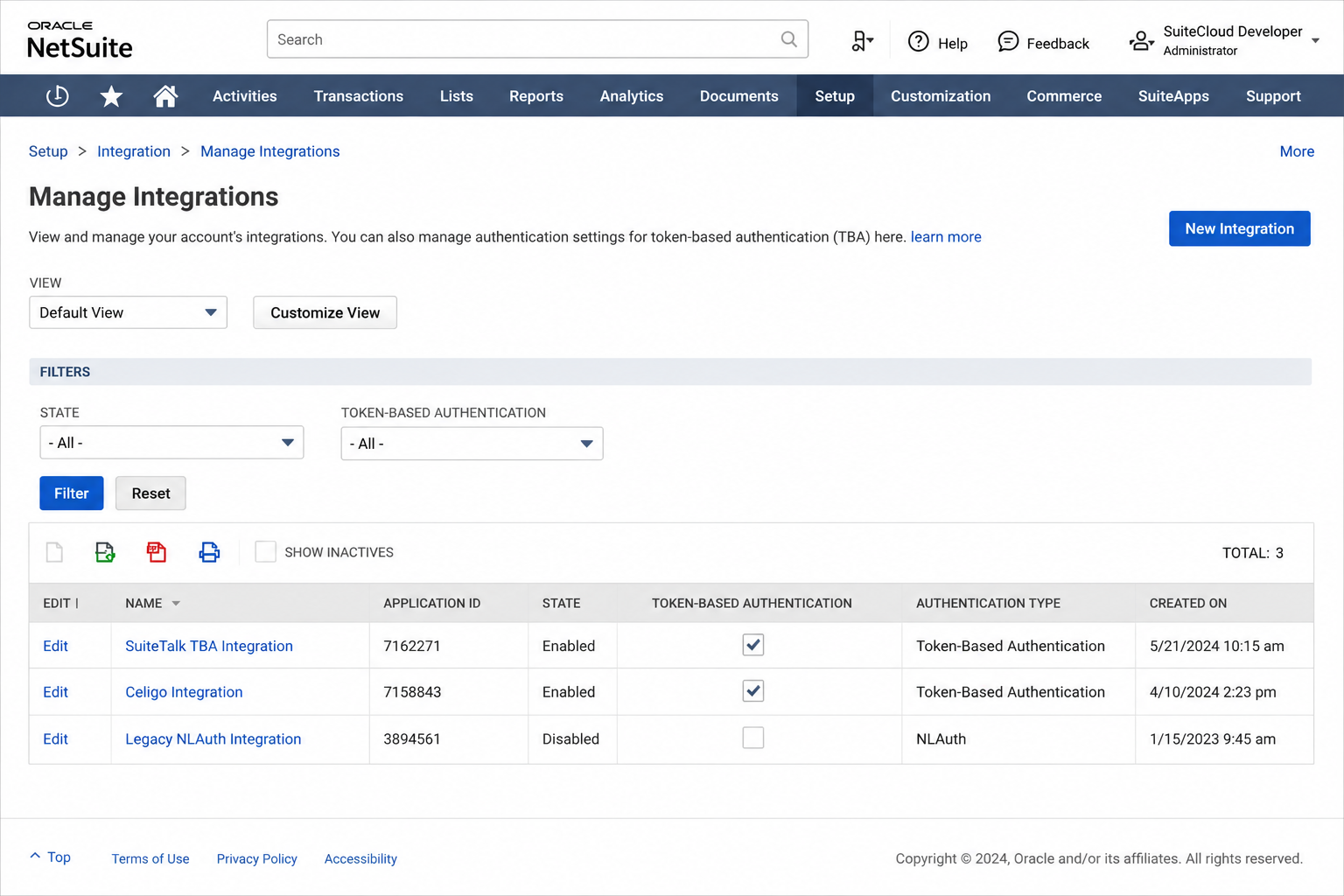
NLAuth-authenticated RESTlets need to migrate to Token-Based Authentication before the 2027.1 release. The migration does not require changes to the RESTlet script itself; only the authentication credentials and calling convention in the external system change.
Step 1: Create a TBA integration record. Navigate to Setup > Integration > Manage Integrations > New. Enable Token-Based Authentication and save. Note the Consumer Key and Consumer Secret.
Step 2: Create an access token. The role used must have RESTlet execution permission. Navigate to Setup > Users/Roles > Access Tokens > New and generate a token for the integration. Note the Token ID and Token Secret. These four values replace the NLAuth credentials in the calling system.
Step 3: Update the calling system's authentication header. Replace the Authorization: NLAuth ... header with an OAuth 1.0 HMAC-SHA256 signature. Most integration platforms have a TBA connector that handles signature computation automatically once the four credential values are configured.
Step 4: Validate in Sandbox before Production. The RESTlet URL does not change. Test the credential swap in Sandbox, confirm the RESTlet returns the expected response, then replicate to Production.
If you are building or maintaining NetSuite integrations and need help deciding on the right architecture, our NetSuite integrations service covers REST Web Services, RESTlet design, and OAuth 2.0 migration. For related reading, see NLAuth deprecation and TBA migration and SuiteScript best practices.
Frequently asked questions
Q: Can a RESTlet call REST Web Services internally? A: There is no practical reason to do this. A RESTlet running on NetSuite's servers already has direct access to the N/record and N/search modules, which are more efficient than making HTTP calls back to the same account. Use SuiteScript modules directly inside a RESTlet rather than making REST Web Services calls.
Q: Do User Event scripts fire when REST Web Services creates or updates a record? A: Yes. REST Web Services saves trigger the same User Event beforeSubmit and afterSubmit scripts as a UI save, a CSV import, or any other save path. If a beforeSubmit script throws an error, the REST Web Services call returns that error as an HTTP response rather than saving the record.
Q: Can REST Web Services return combined data from multiple record types in one call? A: Not directly. REST Web Services returns individual records or SuiteQL query results. If you need to combine data from multiple record types in one request, a RESTlet is the appropriate tool.
Q: What is the difference between a RESTlet and a Suitelet? A: A Suitelet is a server-side SuiteScript that generates a UI page or responds to HTTP requests, typically returning HTML. Suitelets can also return JSON, which makes them usable as REST-like endpoints, but they are primarily designed for building custom NetSuite pages. RESTlets are specifically designed as REST API endpoints and are the correct choice for machine-to-machine integrations.
Q: Are RESTlets subject to SuiteScript governance limits? A: Yes. RESTlets run as SuiteScript executions and consume governance units. A RESTlet that loads records in a loop or runs complex searches on high-volume requests can exhaust its governance budget the same way any other SuiteScript type can. REST Web Services operations are handled by NetSuite's platform layer and have separate concurrency controls.
Related reading
- NetSuite integrations: custom and middleware-based integrations for Shopify, Salesforce, HubSpot, Amazon, and other platforms.
- Hire a NetSuite developer: dedicated developer for API integrations, RESTlet builds, and SuiteScript work.
- NetSuite SOAP web services deprecation: what the SOAP deprecation means for existing integrations and how to prepare.
More From the Blog
NetSuite CAM Reconciliation for Commercial Real Estate
NetSuite CAM reconciliation requires custom records and scripts to allocate operating expenses to tenants by area and generate annual true-up invoices.
NetSuite Lot Tracking with Expiry for Medical Devices
NetSuite lot tracking with expiration dates for medical devices requires FEFO picking logic and automated expiry alerts to meet FDA traceability needs.
Have a NetSuite challenge like this?
We work with post-go-live NetSuite accounts every day. Tell us what you're working on.
Tell us what your account needs.